Online metronome
A free online metronome for guitar, from 30 to 300 BPM, with no sign-up. Accent any beat, add eighths or triplets, let the tempo climb step by step to your target, or drop random beats to find out whether your timing holds without the click.
The metronome needs JavaScript to play: turn it on in your browser to hear the click.
Click a beat to accent it
Subdivision
Clicks between the beats keep your eighths and triplets even.
Start slow and let the tempo climb by itself: the surest way to bring a hard part up to speed.
Silences random beats, so you have to keep time yourself: it shows whether your inner pulse holds. Beat 1 and accents always sound.
The controls: tempo, tap and count-in
Set any tempo from 30 to 300 BPM, and change it while the click plays: you hear the new tempo from the next beat, so you can speed up without stopping. Want the tempo of something you hear? Find it with tap tempo. The common tempos from 60 to 180 BPM are in the table below.
The count-in gives you four clicks, the first accented, before every start, so you come in on beat 1.
- Spacestart and stop the click, or cancel the count-in
- ↑↓one BPM faster or slower, five with Shift; hold the key to keep going
- Ttap the tempo
- Ccount-in on or off
- Esccancel the count-in
How to use a metronome
A metronome makes you faster only if you use it to stay clean. Set it up above, then:
- Pick a part small enough to loop: a bar or two.
- Find your start tempo: the one where you play the part clean three times in a row.
- Name your target: the tempo the song needs.
- Play on the click, not after it. Accent beat 1 so you hear where the bar starts, and add eighths when short notes come out uneven.
- Go a small step faster, and play it clean again before the next. The tempo ramp takes the steps for you: Start at your start tempo, Target at your goal, a small Increase by, and Every as many bars as you need to play it clean.
- After two misses, go back one step and stay there for the day.
- Turn on skip notes to find out whether your time holds when the click drops out.
- Note your best clean tempo, and start tomorrow a step or two below it. This page does not keep it; the TabTunix app does.
Speed is the tempo at which you stay clean, so clean comes first. And eighths at 160 BPM are as fast as sixteenths at 80: a run you cannot play at 160 may be one you can build at 80 (see common tempos). Stop if it hurts.
Accents and beats: set the bar
A bar has 2 to 8 beats, four to start with. Accent any of them, also while the click plays: from its next turn that beat sounds the higher click. At first only beat 1 is accented.
The accent marks where the bar begins, so you hear at once when you drift. A second one on beat 3 splits a bar of four into two halves.
Eighths and triplets
Eighths add one unaccented click halfway between two beats, triplets two. Those clicks are where your short notes go, so a note that comes early or late stands out.
The click has no sixteenths: count them against eighths, two notes to every click. In the TabTunix app one of the drum beats has them on its hi-hat.
Drum grooves are in the app
This page plays a click and nothing else. The free TabTunix app has all kinds of drum beats to play along to in the click's place, and it feels like playing with a drummer.
A metronome that speeds up: the tempo ramp
Turn on the tempo ramp and the metronome speeds up by itself. You set where it starts, the target, how many BPM it adds and every how many bars: it starts at your start tempo, adds the step on the bar line every so many bars, and holds at the target.
Set 60 to 180 BPM, 5 BPM every 2 bars, and the tempo climbs for 48 bars, then stays at 180.
Start slow and let the tempo climb by itself: the surest way to bring a hard part up to speed. How to choose the numbers is under how to use a metronome.
Skip notes: drop beats to test your time
Skip notes silences beats at random, as many as the share you set, from 0 to 70 %. Beat 1 of every bar and every accented beat always sound, so each bar keeps a landmark. A silent beat takes its eighths or triplets with it.
Start low, at 10 or 20 %, and raise it as your time holds. The beats drop one by one, at random: they are not whole silent bars.
Odd bar lengths: 5, 6 and 7 beats
Set the number of beats: five for a bar of five, seven for seven. Then accent where the bar splits. Beats 1 and 4 in a bar of five make a group of three, then two. Six beats with accents on 1 and 4 make two groups of three, the feel of 6/8. Split a bar of seven on 1 and 5: four, then three.
The metronome counts beats. It has no time-signature setting and no 6/8 mode, and a bar has at most eight beats, so there is no 12/8.
5 beats, 3 + 2
6 beats, 3 + 3
7 beats, 4 + 3
A metronome for guitar practice
- Chord changes: one chord a bar, the change right on beat 1. Find the shapes under guitar chords, and drills in the chord change exercises.
- Scales: eighths, every note on a click. The shapes are under guitar scales, the method in how to practice guitar scales.
- A riff from a tab: loop the hard bars slowly, then bring them up, with the guitar tab player.
- Speed: let the tempo ramp take the steps, as how to use a metronome says.
Common tempos: 60 to 180 BPM
Eight tempos guitarists practice at, with how long a beat lasts and what each is good for.
Any other whole tempo from 30 to 300 you set on the dial or type in. To find the tempo of a piece, use tap tempo.
| Tempo | One beat | Good for |
|---|---|---|
| 60 BPM | 1 s | One beat a second: a first pass at a new part, and four seconds for a chord change. |
| 80 BPM | 0.75 s | A riff you just learned from a tab. |
| 90 BPM | 0.67 s | Half of 180: a fast piece counted in half-time. |
| 100 BPM | 0.6 s | A round target to work up to. |
| 120 BPM | 0.5 s | Two beats a second: a bar of four lasts two seconds. |
| 140 BPM | 0.43 s | Eighths here are 4.67 notes a second. |
| 160 BPM | 0.38 s | Eighths here are as fast as sixteenths at 80. |
| 180 BPM | 0.33 s | Eighths here are as fast as sixteenths at 90. |
In the app
From a click to a practice habit
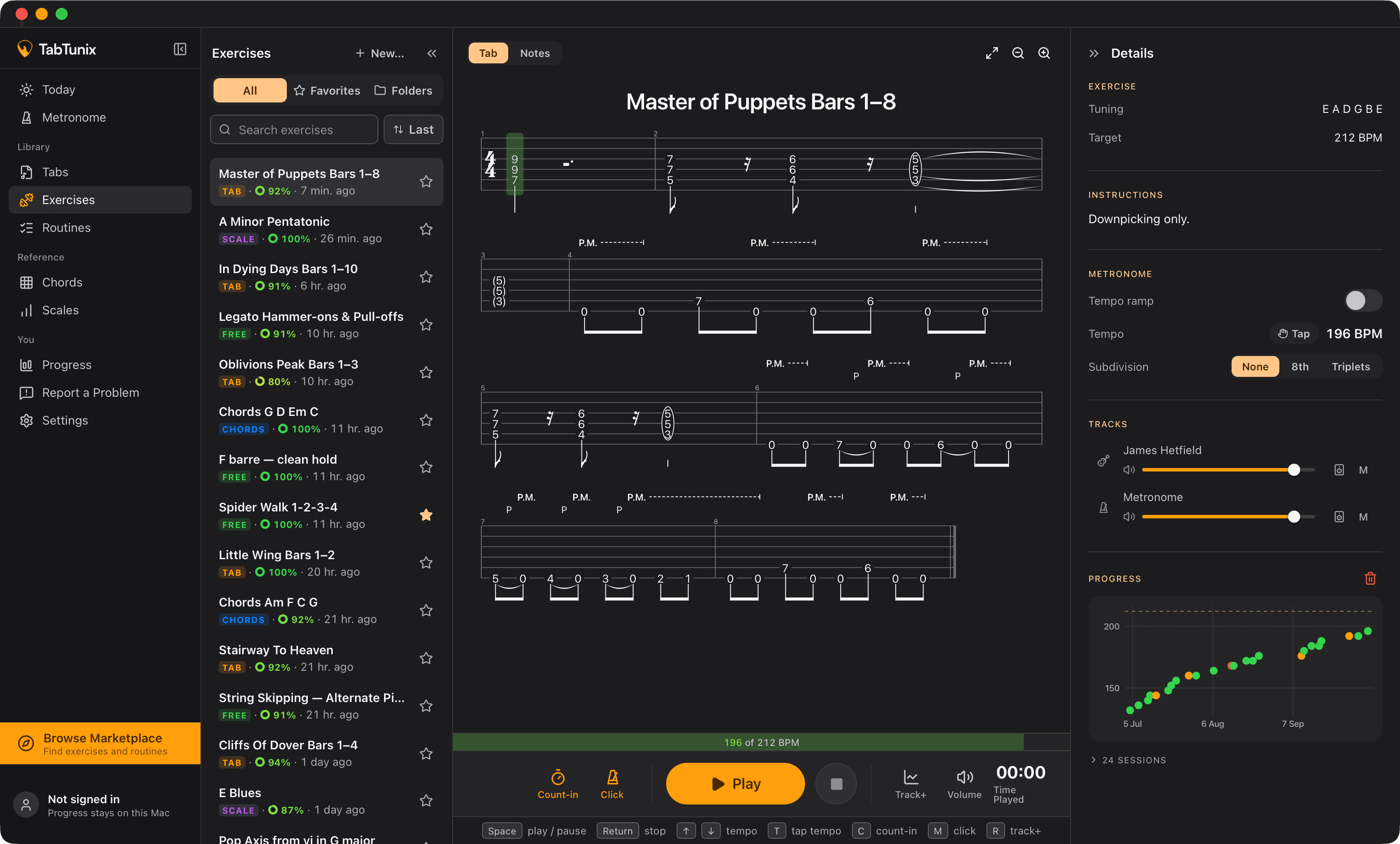
In TabTunix you save a setup as a preset, under a name, in folders and favorites, and call it back with one click. The metronome also sits inside every exercise, with a target tempo, and a routine runs your exercises by the clock. Your best tempo, the fastest you rated good, is kept, and your practice time is logged.
Put a whole session together in a guitar practice routine.
Questions about this metronome
You know which lick it is. Go get it up to tempo. Free, for Mac and Windows.
macOS 13 or newer