Free guitar tab player for your Guitar Pro files
TabTunix is a free guitar tab player for your Guitar Pro files, on Mac and Windows. You hear the whole band, every track but the vocals. Slow it down to your tempo, loop the bars you keep missing, mute your part to play it yourself or solo it to hear it, and read tab or standard notation.
Download for free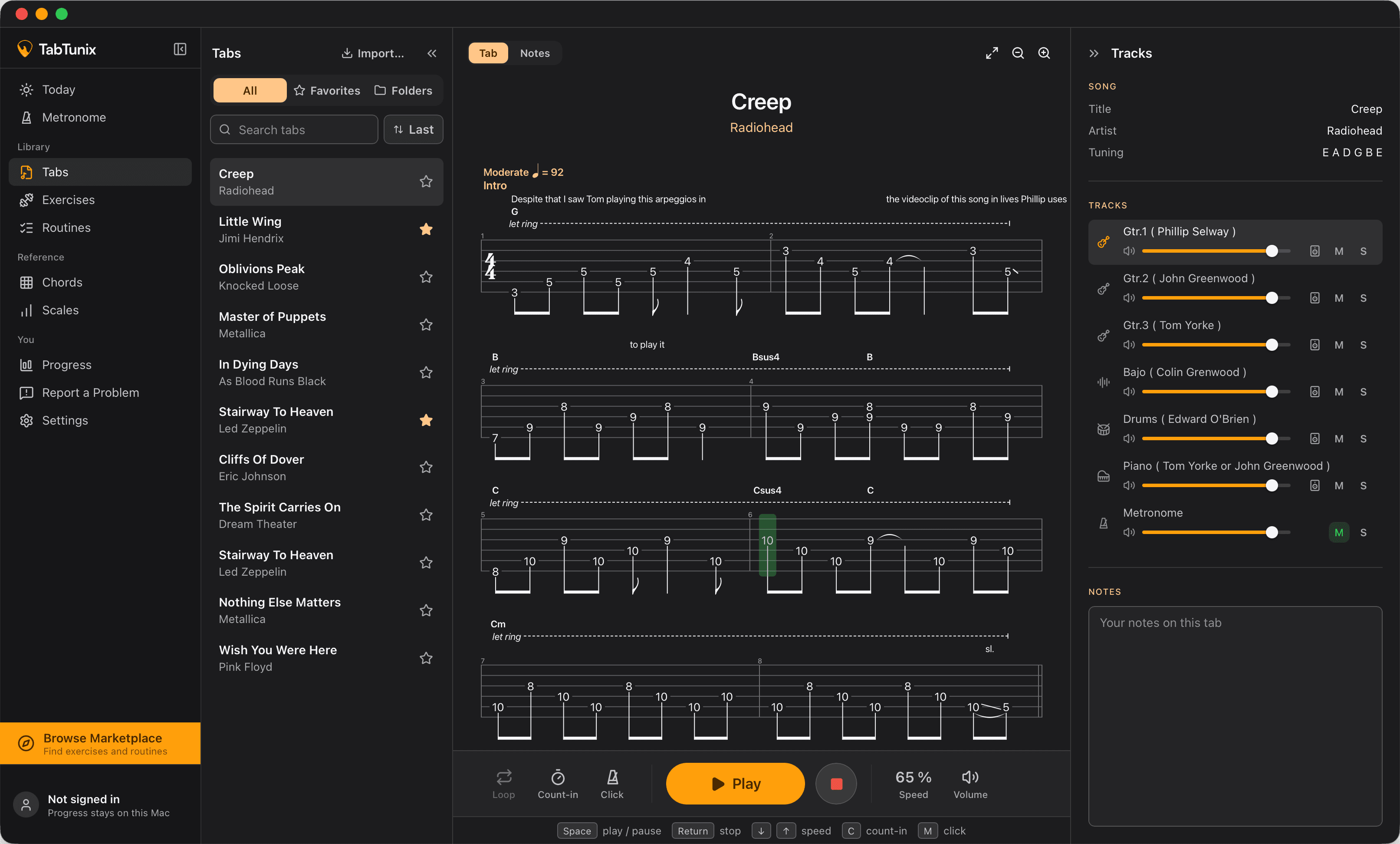
What the guitar tab player does
As a guitar tab reader, TabTunix keeps your place: the note you hear is marked in the score, and the score scrolls along with the song.
The whole band
Guitars, bass, drums and the rest play together, so you hear where your part sits in the song.
Slow it down
Bring the tab down from its own tempo to one you can play, and back up as the part comes.
Loop the hard bars
Loop the hard part until it comes clean, and play it to a metronome click when you want to check your timing.
Mute or solo
Mute your part and play along with the band, or solo it to hear every note, and turn any track up or down.
Tab or notation
Read tablature or standard notation, whichever you think in, and zoom the score until it reads from where you sit.
Kept with each tab
Your speed, your loop and your track volumes stay with the tab, so the next session starts at the tempo you reached.
Your Guitar Pro tabs in one library
Every Guitar Pro file you open in TabTunix stays in your library as a copy of its own: the file in your downloads can move or go, and the tab stays. Each tab is listed under the title and artist its file names, so there is nothing to type in. Sort your tabs into folders, star your favorites, and find any of them by title or artist.
How to open Guitar Pro files
To open a Guitar Pro file you need a program that reads tabs: TabTunix is a free Guitar Pro viewer and player for files from Guitar Pro 3 to 8. A Guitar Pro file, a .gp5 file for instance, is a tab, not a recording: it holds the notes, the tracks and the tempo of a song, and the program that opens it makes the sound. Its ending names the version of Guitar Pro whose format it is in:
- .gp3
- Guitar Pro 3
- .gp4
- Guitar Pro 4
- .gp5
- Guitar Pro 5
- .gpx
- Guitar Pro 6
- .gp
- Guitar Pro 7 and 8
TabTunix opens all five, even a file whose ending doesn't match its version. The endings and versions are as Guitar Pro's user guide pairs them (read ). There are three ways to open them:
On a Mac
- On the Tabs screen, choose Import…, or press ⌘O anywhere in the app, and pick one file or several.
- Drag the files from Finder onto the Tabs screen.
- In Finder, right-click a file, choose Open With › TabTunix, then “Open as Tab”.
On Windows
- On the Tabs screen, choose Import…, or press Ctrl+O anywhere in the app, and pick one file or several.
- Drag the files from Explorer onto the Tabs screen.
- In Explorer, right-click a file, choose Open with › TabTunix, then “Open as Tab”.
Whatever opened your Guitar Pro files before still opens them on a double-click: TabTunix is one more choice under Open With, not their default. And you can bring in all your tabs in one go: a file that only looks like a Guitar Pro file, or is damaged, is named and left out, and the rest come in.
How your tabs sound
The electric guitars you hear are recordings made for TabTunix, of a single-coil and a humbucker guitar, clean, crunchy or distorted as the tab's track asks for, with its bends, slides, vibrato, palm mutes and hammer-ons as the tab writes them. The bass and the drums are samples of a real bass and a real drum kit. Every other instrument, from the acoustic guitar to piano and strings, plays from a General MIDI set that comes with the app. If a track's sound doesn't suit you, give it another one.
Practice
From a loop to an exercise
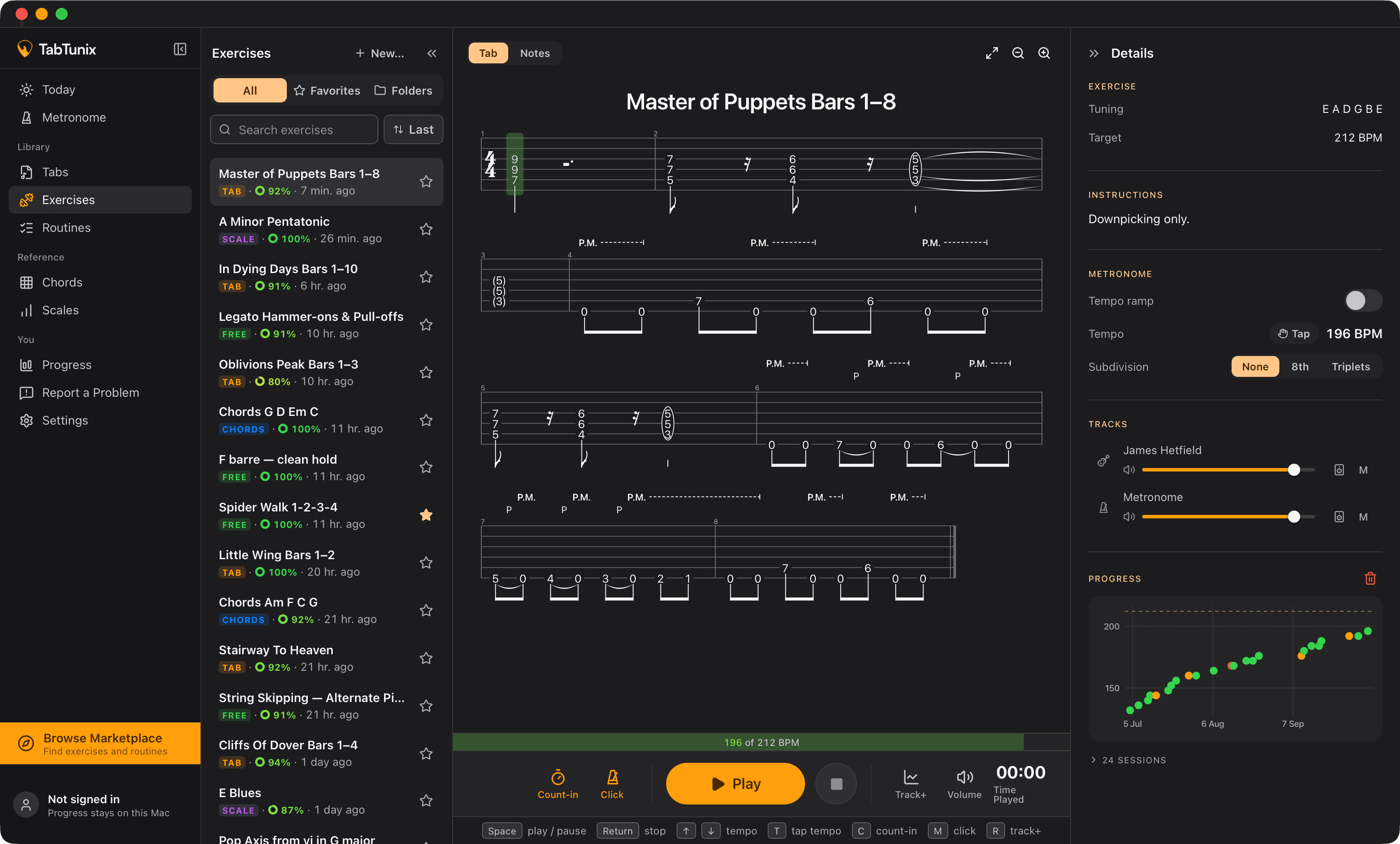
When a loop starts to sit under your fingers, make it an exercise with a target tempo. Play the exercise, rate each take, and watch your tempo climb toward the target. Put it in your guitar practice routine, beside your guitar exercises.
Start with the hardest bars of the song you're learning now.
Download for freeTabTunix and Guitar Pro
TabTunix opens Guitar Pro files, plays them and helps you practice them; it does not write or edit tabs. To write your own you need a tab editor, and Guitar Pro and TuxGuitar are two (both read on their makers' sites, ). If you looked for a free Guitar Pro alternative only to play the files you have and practice with them, TabTunix does that at no cost. It has no tie to Guitar Pro or its maker.
What you need
On a Mac, macOS 13 or newer, on Apple silicon or Intel. On a PC, Windows 10 (22H2) or Windows 11 on a 64-bit Intel or AMD processor. Then your Guitar Pro files. TabTunix is free, not a trial, and no feature will ever be behind a paywall.
Questions about the guitar tab player
Play your part with the band, slow at first, then at the song's own tempo. Free, for Mac and Windows.